IP rotation in Python means changing the proxy exit IP used by your requests. Your Python script can choose a different proxy endpoint for each request. You can also use a provider gateway that handles rotation for you. The right choice depends on whether your task needs a new IP for each connection or one stable IP for a session.
This guide starts with a small Requests example. It then explains when to move to aiohttp and how to control request volume. For web scraping, location checks, or API testing, start with two test requests. Increase request volume only after the connection works.
A pool of static endpoints gives you a list of proxy addresses. Your script chooses an address for each request. Cycling through the list changes the selected endpoint, but each endpoint can still retain its own IP.
A rotating gateway gives you one address. The provider chooses the exit IP according to the product, credentials, and session settings. Changing the URL in Python is unnecessary when the gateway already handles the rotation you need.
Check the active product in your Proxy-Cheap dashboard before choosing either method. A single static proxy does not become rotating because you call it repeatedly. Two requests can also return the same IP from a rotating pool, so a repeated IP alone is not proof of a fault.
| Setup | Who chooses the exit? | Best fit |
|---|---|---|
| Static endpoint pool | Your script selects an endpoint | Explicit endpoint selection |
| Rotating gateway | The provider, using your product settings | Independent requests with provider-managed rotation |
| Sticky session | The provider retains the session exit while available | Requests that need one consistent identity |
Use a virtual environment and install the client you need:
python -m pip install requests
The example below uses HTTP proxy endpoints. Keep credentials in local environment variables or your secret manager, not in source control or screenshots. PROXY_URLS should contain one complete endpoint per line, such as http://USER:PASSWORD@HOST:PORT. Percent-encode special characters inside a URL’s username and password.
Save the Python example below as rotate_proxies.py. In the same terminal, set PROXY_URLS before running the file. Replace every placeholder with your own generated credentials.
PowerShell:
$env:PROXY_URLS = "http://USER:PASSWORD@HOST_A:PORT`nhttp://USER:PASSWORD@HOST_B:PORT"
python rotate_proxies.py
macOS or Linux (Bash):
export PROXY_URLS=$'http://USER:PASSWORD@HOST_A:PORT\nhttp://USER:PASSWORD@HOST_B:PORT'
python rotate_proxies.py
For a provider-managed rotating gateway, use the same generated gateway URL on both lines. Do not paste these placeholder URLs unchanged.
This deliberately small example makes two sequential requests. It selects the next endpoint before each request, checks the HTTP result, and prints the exit IP returned by the test service. Supply at least two distinct endpoints to demonstrate endpoint selection.
import itertools
import os
import requests
proxy_pool = os.environ["PROXY_URLS"].splitlines()
proxy_cycle = itertools.cycle(proxy_pool)
proxy_url = next(proxy_cycle)
response = requests.get(
"https://api.ipify.org?format=json",
proxies={"http": proxy_url, "https": proxy_url},
timeout=(10, 30),
)
response.raise_for_status()
print(response.json())
# Select the next endpoint for a second request.
proxy_url = next(proxy_cycle)
response = requests.get(
"https://api.ipify.org?format=json",
proxies={"http": proxy_url, "https": proxy_url},
timeout=(10, 30),
)
response.raise_for_status()
print(response.json())
Example output:
{'ip': '198.51.100.10'}
{'ip': '203.0.113.20'}
These documentation-only IP addresses illustrate the output shape; your results will show real exit addresses. response.raise_for_status() checks for HTTP errors before the script prints JSON.
Compare the returned IPs with the proxies in your pool. With one static endpoint, both results should normally use that endpoint’s exit IP. For a rotating gateway, use the mode and credentials from your dashboard. A new request does not always mean a unique IP.
For a rotating-gateway test, put the same complete gateway URL on both lines of PROXY_URLS. The Python endpoint then stays the same while the provider selects the exit IP. This checks provider-managed rotation; it does not demonstrate switching between two static proxies.
The example assumes PROXY_URLS is nonempty and contains valid endpoints. For an application, validate the list at startup. Handle connection errors without exposing proxy URLs. Decide when to retry or remove failed endpoints. Repeating a failed purchase or form submission can create duplicates, so do not add blanket retries to state-changing requests.
In our connection checks, three Random IP requests returned three different exit IPs. Three sequential requests with the same session ID kept the same exit IP. These short checks confirm the observed behavior, not a guaranteed unique IP on every request or the full session lifetime.
Use a sticky session or static endpoint for a sequence that must keep the same identity, such as an authorized login followed by several page requests. Switching IPs between those steps can interrupt the session.
Keep cookies and other session state together with the proxy selection. A Requests Session can reuse cookies and connections, but it does not choose the right identity for your task. Assign separate sessions to separate authorized workflows rather than mixing them through one shared cookie store.
For the available Proxy-Cheap session modes, check the product rotation guidance. Use the current dashboard settings as the final reference for your plan.
In the Proxy-Cheap credentials generator, Random IP and Session ID are separate modes. For a sticky workflow, select Session ID and reuse the exact generated URL, including the session and TTL suffix added to the password. Keep that suffix intact and use a separate session ID for a separate workflow. The dashboard currently describes session IDs as lasting up to 30 minutes; availability can still affect the exit IP.
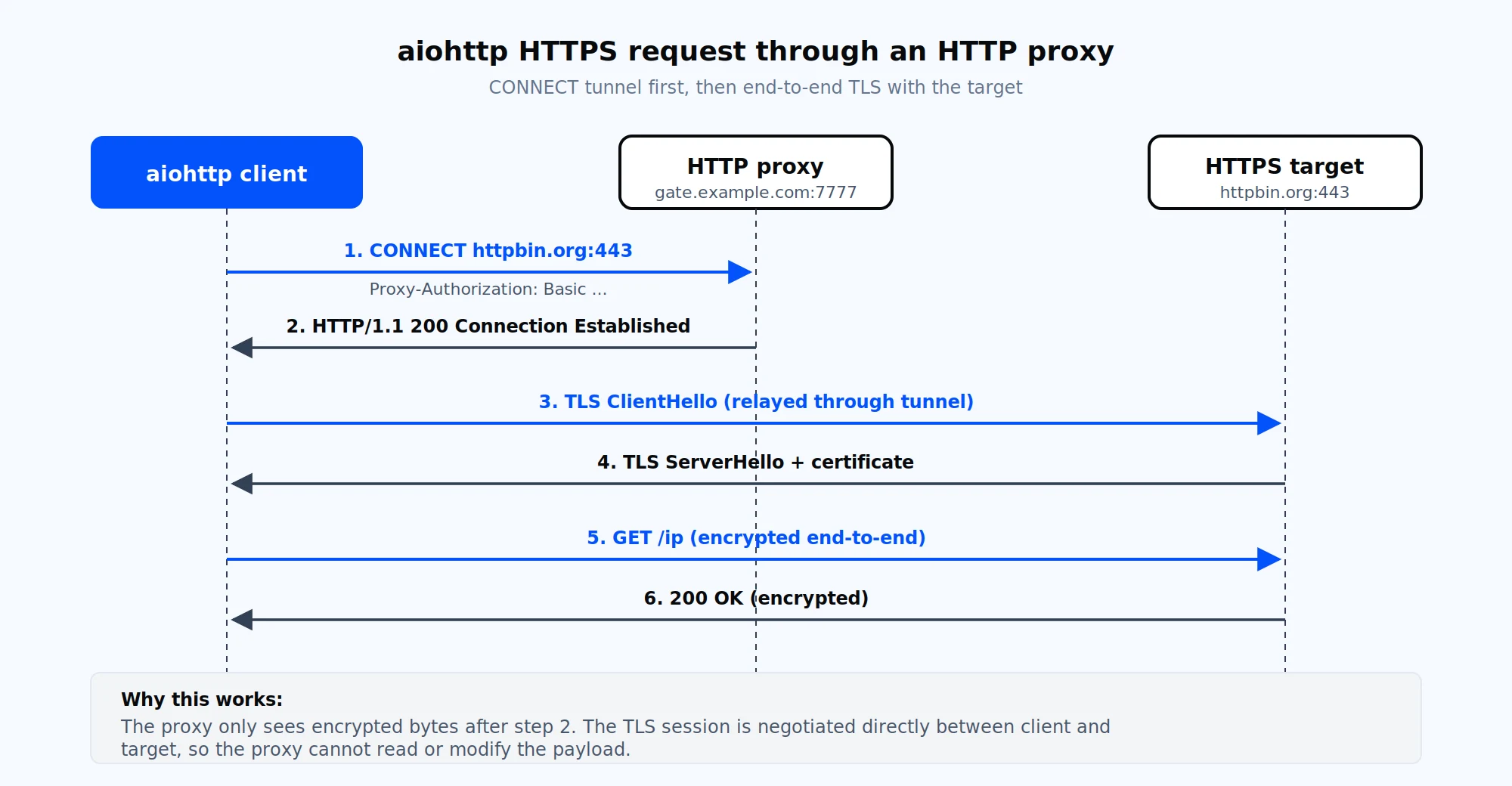
The runnable example above uses Requests. For an asynchronous version, install aiohttp with python -m pip install aiohttp and follow the linked integration guide.
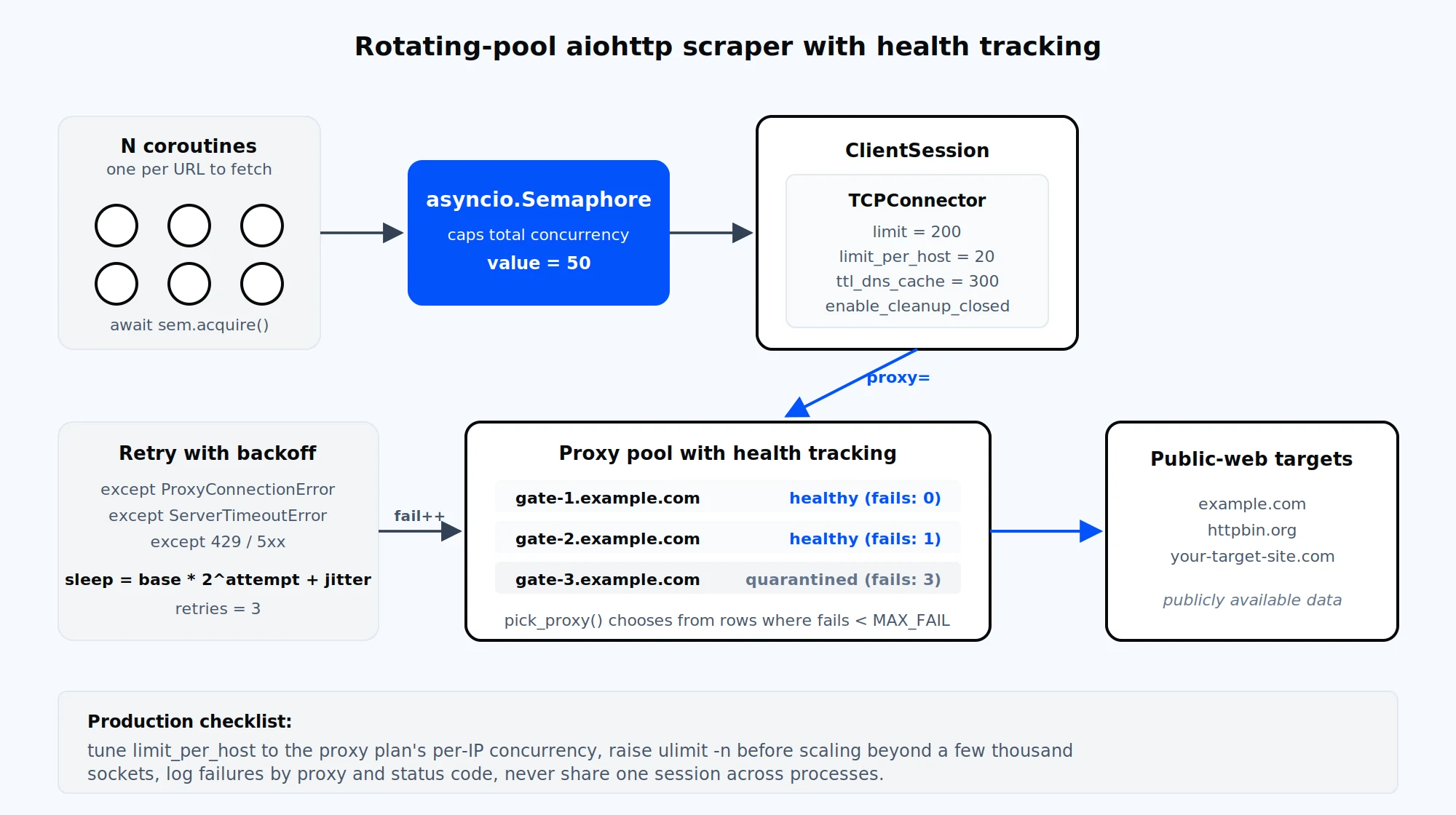
With aiohttp, create a ClientSession, choose the proxy for each request, and pass it through the request’s proxy parameter. Proxy authentication is separate from the destination website’s authentication. Do not send proxy credentials in the website’s Authorization header.
Bound the number of concurrent requests and set a total timeout before increasing throughput. Associate a proxy with the whole workflow when cookies or a stable IP matter, and close the session after the work finishes. Our aiohttp integration guide covers the client-specific setup.
The aiohttp authentication API varies by version. Check the installed version against the official proxy documentation before copying a BasicAuth or proxy-header example into your application.
In Requests, response.status_code contains the HTTP status code. A successful IP check normally returns 200. The example uses response.raise_for_status() to stop on a 4xx or 5xx response before reading JSON.
A connection error or timeout can happen before the server responds. In that case, there may be no HTTP status code to inspect.
Use the proxy testing checklist before a longer run. Keep logs useful by recording timestamps and error categories while removing passwords and complete authenticated proxy URLs.
Selecting a different value in your script does not change your network connection’s public IP. The examples here send requests through proxy endpoints; a rotating gateway chooses the exit IP on the provider side.
You may be using a static endpoint, a sticky session, or a reused connection. A rotating pool can also select the same exit again. Check the product mode and compare several small test requests before treating a repeated IP as a fault.
Use per-request rotation for independent requests when your product supports it. Keep one session and proxy identity together for login or cookie-dependent workflows. Follow the destination’s request limits in either case.
Use a static pool when you want explicit endpoint selection, a rotating gateway when the product should manage exit IP changes, and a sticky session when several requests belong together. Once the two-request check works, add controlled concurrency and monitoring to match the workload.
Need a gateway for this Python setup? Compare Proxy-Cheap rotating residential plans, choose the session mode for your workflow, and test the endpoint before scaling up. Review the Requests proxy reference for library behavior.